ページ

Monday, March 29, 2010

localStorage vs sessionStorage in WebStorage

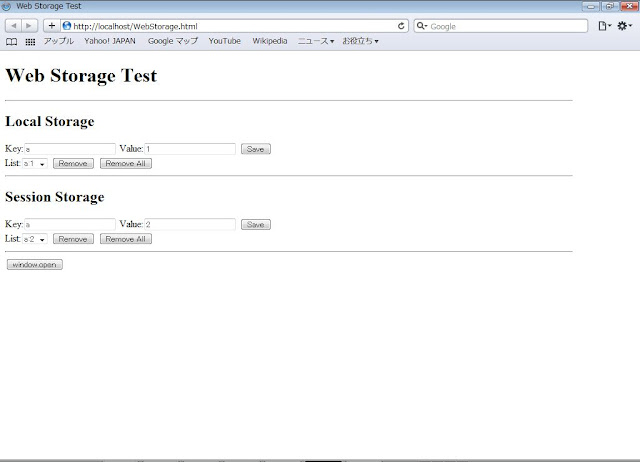
I checked out localStorage and sessionStorage.

<!DOCTYPE html>
<html>
<head>
<meta charset="UTF-8" />
<title>Web Storage Test</title>
</head>
<body onload="showAll()">
<h1>Web Storage Test</h1>
<hr width="90%" align="left">
<h2>Local Storage</h2>
Key:<input id="key1" type="text"> Value:<input id="value1" type="text">
<button onclick="save1()">Save</button>
<br />
List:<select id="entries1" size="1" onchange="onEntrySelected1()"></select> <button onclick="remove1

()">Remove</button>
<button onclick="removeAll1()">Remove All</button>
<br />

<hr width="90%" align="left">

<h2>Session Storage</h2>
Key:<input id="key2" type="text"> Value:<input id="value2" type="text">
<button onclick="save2()">Save</button>
<br />
List:<select id="entries2" onchange="onEntrySelected2()"></select> <button onclick="remove2()">Remove</button>
<button onclick="removeAll2()">Remove All</button>
<br />

<hr width="90%" align="left">

<button onclick="window.open(location.href);">window.open</button>

<script type="text/javascript">
<!--

var key1 = document.getElementById("key1");
var value1 = document.getElementById("value1");
var key2 = document.getElementById("key2");
var value2 = document.getElementById("value2");
var entries1 = document.getElementById("entries1");
var entries2 = document.getElementById("entries2");

if (window.addEventListener)
{
    window.addEventListener("storage", showAll, false);
}
else if (window.attachEvent)
{
    //window.attachEvent("storage", showAll);
    document.write('<button onclick="window.location.reload();">Reload</button>');
}
else
{
    document.write('<button onclick="window.location.reload();">Reload</button>');
}


function showAll()
{
    entries1.innerHTML = "";
    entries2.innerHTML = "";
    for(var i=0; i<localStorage.length; i++)
    {
        var k = localStorage.key(i);
        entries1.options[entries1.options.length] = new Option(k+":"+localStorage[k], k);
        if(localStorage.length == 1)
        {
            key1.value = k;
            value1.value = localStorage[k];
        }
    }
    for(var j=0; j<sessionStorage.length; j++)
    {
        var k = sessionStorage.key(j);
        entries2.options[entries2.options.length] = new Option(k+":"+sessionStorage[k], k);
        if(sessionStorage.length == 1)
        {
            key2.value = k;
            value2.value = sessionStorage[k];
        }
    }
}

function save1()
{
    localStorage[key1.value] = value1.value;
}

function remove1()
{
    delete localStorage[key1.value];
}

function removeAll1()
{
    localStorage.clear();
}

function onEntrySelected1()
{
    var selectedOption = entries1.options[entries1.selectedIndex];
    key1.value = selectedOption.value;
    value1.value = localStorage[selectedOption.value];
}

function save2()
{
    sessionStorage[key2.value] = value2.value;
}

function remove2()
{
    delete sessionStorage[key2.value];
}

function removeAll2()
{
    sessionStorage.clear();
}

function onEntrySelected2()
{
    var selectedOption = entries2.options[entries2.selectedIndex];
    key2.value = selectedOption.value;
    value2.value = sessionStorage[selectedOption.value];
}
-->
</script>

</body>
</html>


Open another New Window


localStorage is useful for Offline Web Application or something.

Saturday, March 20, 2010

Trying the basic HTML5 part 2

I checked out Canvas element by the following code I made.


<!DOCTYPE html>
<html lang="ja">
<head>
<meta charset="UTF-8" />
<title>Analog clock by Javascript feat. HTML5</title>
</head>
<body>

<canvas id="clock" width="300" height="300">現在お使いのブラウザはCanvas要素をサポートしていません。</canvas>
<script type="text/javascript">
<!--

var canvas = document.getElementById('clock');
main();


function main()
{
    if(canvas.getContext)
    {
        clock();
        setInterval('clock()', 1000);
    }
}

function clock()
{
    var context = canvas.getContext('2d');
    context.save();

    context.clearRect(0, 0, 300, 300);
    context.translate(150, 150);
    context.scale(1.5, 1.5);
    context.rotate( - Math.PI / 2 );
    context.save();

    // dial plate
    context.strokeStyle = "gray";
    context.fillStyle = "white";
    context.lineWidth = 4;
    context.lineCap = "round";

    context.beginPath();
    for (var i=0; i<12; i++)
    {
        context.rotate( Math.PI / 6 );
        context.moveTo(60, 0);
        context.lineTo(70 + ( (i%3 == 2) ? 6 : 0 ), 0);
    }
    context.stroke();
    context.restore();
    context.save();

    var now = new Date();
    var hour = now.getHours();
    var minute = now.getMinutes();
    var second = now.getSeconds();
    hour = (hour >= 12) ? (hour - 12) : hour;

    // hour hand
    context.strokeStyle = "black";
    context.fillStyle = "black";

    // calculating formula for the angle of the hour hand

    // ( 2 * Math.PI / 12 ) * hour + ( ( 2 * Math.PI / 12 ) / 60 ) * minute + ( ( ( 2 * Math.PI / 12 ) /  60 ) / 60  ) * second
    context.rotate( ( Math.PI / 6 ) * hour + ( Math.PI / 360 ) * minute + ( Math.PI / 21600 ) * second );
    context.lineWidth = 8;
    context.lineCap = "round";
    context.beginPath();
    context.moveTo(-10, 0);
    context.lineTo(45, 0);
    context.stroke();
    context.restore();
    context.save();

    // minute hand
    context.strokeStyle = "black";
    context.fillStyle = "black";

    // calculating formula for the angle of the minute hand

    // ( 2 * Math.PI / 60 ) * minute + ( ( 2 * Math.PI /  60 ) / 60 ) * second
    context.rotate( ( Math.PI / 30 ) * minute + ( Math.PI / 1800 ) * second );
    context.lineWidth = 6;
    context.lineCap = "round";
    context.beginPath();
    context.moveTo(-14, 0);
    context.lineTo(62, 0);
    context.stroke();
    context.restore();
    context.save();
   
    // second hand
    context.strokeStyle = "red";
    context.fillStyle = "red";
    // calculating formula for the angle of the second hand
    // ( 2 * Math.PI / 60 ) * second

    context.rotate( Math.PI / 30 * second );
    context.lineWidth = 4;
    context.lineCap = "round";
    context.beginPath();
    context.moveTo(-15, 0);
    context.lineTo(70, 0);
    context.stroke();
    context.restore();

    // frame
    context.beginPath();
    context.lineWidth = 12;
    context.strokeStyle = "green";
    context.arc(0, 0, 90, 0, Math.PI * 2, true);
    context.stroke();
    context.restore();
}

//-->
</script>

</body>
</html>


1. Firefox


2.Google Chrome


3. Opera


4. Internet Explorer Platform Preview ( IE9 Preview )


IE9 (Preview) does NOT support Canvas element YET.
(Though, I saw an article on the Internet, Microsoft wanted to separate the Canvas 2D API from HTML5.)
Anyway, the combination of HTML5 and Japascript would provide us to easily create a lot of Rich Internet Applications as if Flash.

By the way, separating between Javascript(external file) and HTML is better than the above code.
Plus, I re-coded Javascript to adjust the Clock size to the size of the canvas.


Clock.js

function Clock(id)
{
    this.id = id;
    this.canvas = document.getElementById(id);
    if(this.canvas.getContext)
    {
        this.context = this.canvas.getContext('2d');
        this.centerX = this.canvas.width / 2;
        this.centerY = this.canvas.height / 2;
        this.clocksize = 0;
        this.hour = 0;
        this.minute = 0;
        this.second = 0;
        this.CanStartClock = true;
    }
}

Clock.prototype =
{
    Draw:function ()
    {
        if(this.canvas.getContext)
        {
            this.Init();
            this.DrawDialplate();
            this.DrawHourHand();
            this.DrawMinuteHand();
            this.DrawSecondHand();
            this.DrawFrame();
        }
    },

    Init:function()
    {
        var now = new Date();
        var hour24 = now.getHours();
        this.hour = (hour24 >= 12) ? (hour24 - 12) : hour24;
        this.minute = now.getMinutes();
        this.second = now.getSeconds();

        this.clocksize = this.canvas.width > this.canvas.height ? this.canvas.height : this.canvas.width;

        this.canvas.width = this.canvas.width;
        this.canvas.height = this.canvas.height;
        this.context.clearRect(0, 0, this.canvas.width, this.canvas.height);
        this.context.translate(this.centerX, this.centerY);
        this.context.scale(1.5, 1.5);
        this.context.rotate( - Math.PI / 2 );
        this.context.save();
    },

    DrawDialplate:function()
    {
        this.context.strokeStyle = "gray";
        this.context.fillStyle = "white";
        this.context.lineWidth = this.clocksize * 0.005;
        this.context.lineCap = "round";

        this.context.beginPath();
        for (var i=0; i<12; i++)
        {
            this.context.rotate( Math.PI / 6 );
            this.context.moveTo(this.clocksize * 0.22, 0);
            this.context.lineTo((this.clocksize * 0.25),0);
        }
        this.context.stroke();
        this.context.restore();
        this.context.save();
    },

    DrawHourHand:function()
    {
        this.context.strokeStyle = "black";
        this.context.fillStyle = "black";
        this.context.rotate( ( Math.PI / 6 ) * this.hour + ( Math.PI / 360 ) * this.minute + ( Math.PI /
21600 ) *  this.second );
        this.context.lineWidth = this.clocksize * 0.025 ;
        this.context.lineCap = "round";
        this.context.beginPath();
        this.context.moveTo( - this.clocksize / 60, 0);
        this.context.lineTo(this.clocksize / 6.5, 0);
        this.context.stroke();
        this.context.restore();
        this.context.save();
    },

    DrawMinuteHand:function()
    {
        this.context.strokeStyle = "black";
        this.context.fillStyle = "black";
        this.context.rotate( ( Math.PI / 30 ) * this.minute + ( Math.PI / 1800 ) * this.second );
        this.context.lineWidth = this.clocksize * 0.015;
        this.context.lineCap = "round";
        this.context.beginPath();
        this.context.moveTo( - this.clocksize / 60, 0);
        this.context.lineTo(this.clocksize / 4.8, 0);
        this.context.stroke();
        this.context.restore();
        this.context.save();
    },

    DrawSecondHand:function()
    {
        this.context.strokeStyle = "red";
        this.context.fillStyle = "red";
        this.context.rotate( Math.PI / 30 * this.second );
        this.context.lineWidth = this.clocksize * 0.01;
        this.context.lineCap = "round";
        this.context.beginPath();
        this.context.moveTo( - this.clocksize / 40, 0);
        this.context.lineTo(this.clocksize / 4.2, 0);
        this.context.stroke();
        this.context.restore();
        this.context.save();
    },

    DrawFrame:function()
    {
        this.context.beginPath();
        this.context.lineWidth = this.clocksize / 40;
        this.context.strokeStyle = "green";
        this.context.arc(0, 0, (this.clocksize / 3.5), 0, Math.PI * 2, true);
        this.context.stroke();
        this.context.restore();
        this.context.save();
    }
}


Clock.html
<!DOCTYPE html>
<html lang="ja">
<head>
<meta charset="UTF-8" />
<title>Analog clock by Javascript feat. HTML5</title>
<script type="text/javascript" src="Clock.js"></script>
</head>
<body>

<canvas id="clock" width="300" height="300">現在お使いのブラウザはCanvas要素をサポートしていません。</canvas>
<script type="text/javascript">
<!--

clock = new Clock('clock');

Main = function()
{
    clock.Draw();
    setTimeout(this.Main, 100);
}


Main();

-->
</script>

</body>
</html>

Friday, March 19, 2010

Trying the basic HTML5

Today, I was checking out the basic code of HTML5 like following.

<!DOCTYPE html>
<html lang="ja">
<head>
<meta charset="UTF-8" />
<title>HTML5 Demo</title>
</head>
<body>

<svg><circle r="50" cx="50" cy="50" fill="red" Stroke="blue" Stroke-width="2" /></svg>

</body>
</html>


1. Internet Explorer 8


 Of course it doesn't work, because IE8 does not support HTML5.
 (Internet Explorer 8 version 8.0.6001.18882)

2. Internet Explorer Platform Preview (IE9 Preview)


 *Select [Page]-[Open] in the menu.


 * Enter URL in the Open-box. ("http://ie.microsoft.com/testdrive/" is set as default)

 Windows Internet Explorer Platform Preview, version 1.9.7745.6019
 (Internet Explorer version 9.0.7745.6019)

3.Firefox(version 3.6)


 * Enter about:config in the location bar


 *Enter "html5" in the filter-box to find "html5.enable"


 *Do Double-Click in the html5.enable to change the value from false to true.
 (Firefox version 3.6)

4.Google Chrome and Opera


 (Google Chrome version 4.1.249.1036)
 (Opera version 10.50 build 3296)

I think those must depend on their layout engines or something...
Well, I have to think/feel the next-generation Internet contents are definitely coming along with such an architecture.

Thursday, March 18, 2010

Internet Explorer Platform Preview

I checked out how IE9 is going to work by ie9 preview.
Next generation browsers must be greater than current ones because of HTML5,hardware accelerated and JavaScript as well.

Internet Explorer Platform Preview TestDrive
http://ie.microsoft.com/testdrive/Default.html


トップのこの画像。。。Dragon Ball のカリン塔?

Saturday, February 27, 2010

"Hello World" application worked on Android

I'm getting a bit interested in developing something for mobile application.
so, today, I investigated something about how to create an application worked on Android.

Android SDK
http://developer.android.com/sdk/index.html

Eclipse
http://www.eclipse.org/

Eclipse:


  *Eclipse IDE for Java Developers

Run the project as Android Application:


This kind of programming seems easy for beginners.

HelloWorld.java
package demo.android.helloworld;

import android.app.Activity;
import android.os.Bundle;
import android.widget.TextView;

public class HelloWorld extends Activity {
/** Called when the activity is first created. */
    @Override
    public void onCreate(Bundle savedInstanceState) {
super.onCreate(savedInstanceState);
//setContentView(R.layout.main);
TextView txt = new TextView(this);
txt.setText("Hello World!");
setContentView(txt);
}
}

Friday, February 26, 2010

It's about time to get ready to learn Qt programming for embedded systems or something like MeeGo?

Intel and Nokia announced MeeGo, which is a combination of the Moblin and Maemo platforms.
As for developing the application, it seems Qt is ( a or the default ?) development framework for MeeGo.

So I tried using Qt Creator for Windows to investigate how difficult or easy to develop the software.


MeeGo
http://meego.com/

Qt Creator


As usual, I just created very very verrrry simple Qt GUI application.(it's nothing special.)


 I think this software development is not so hard unless I will try to create complex programs.
and I think Qt must be very useful for not only embedded software but also some applications on linux and MacOS as well.


main.cpp
#include "mainwindow.h"
#include "qlabel.h"
#include "qtextcodec.h"

int main(int argc, char *argv[])
{
QApplication a(argc, argv);

QTextCodec::setCodecForTr(QTextCodec::codecForLocale());
QTextCodec::setCodecForCStrings(QTextCodec::codecForLocale());

MainWindow w;
w.setWindowTitle("Qt Application Demo");
w.setMaximumSize(400,260);
w.setMinimumSize(400,260);
w.resize(400,260);
QLabel *lbl = new QLabel(&w);
lbl->setFrameStyle(QFrame::Panel | QFrame::Sunken);
lbl->setText("<font color=red>Hello World!</font>");
QFont font("Verdana",32,12,false);
lbl->setFont(font);
lbl->setAlignment(Qt::AlignVCenter | Qt::AlignHCenter);
lbl->setGeometry(30,40,340,180);
w.show();
return a.exec();
}


mainwindow.cpp
#include "mainwindow.h"
#include "ui_mainwindow.h"

MainWindow::MainWindow(QWidget *parent) :
QMainWindow(parent),
ui(new Ui::MainWindow)
{
ui->setupUi(this);

QAction* exitAction = new QAction(tr("終了(&X)"),this);
exitAction->setStatusTip("アプリケーションを終了します。");
connect(exitAction,SIGNAL(triggered()),this,SLOT(close()));

QMenu* menu = this->menuBar()->addMenu(tr("メニュー(&M)"));
menu->addAction(exitAction);


}

MainWindow::~MainWindow()
{
delete ui;
}

void MainWindow::changeEvent(QEvent *e)
{
QMainWindow::changeEvent(e);
switch (e->type()) {
case QEvent::LanguageChange:
ui->retranslateUi(this);
break;
default:
break;
}
}

Survey Application on Windows Azure

Windows Azure Platform is metered, so it could be considered of value for some short-term business which is sort of a survey system, event announcement, Campaign, blah blah blah...
This time, I will post something about a simple Survey Application on Windows Azure.

1.Silverlight on Windows Azure with Azure Storage.


How to get the data and know the progress report.

2.WPF Application for the Report.


  *Chart by WPFToolKit and able to download excel or csv file.
  *Getting the data from Azure Storage Table by Windows Azure Storage Serivces REST API.


 *Paging by Original DataPager.

 I think using the excel file must be more powerful to analyze the data for marketing.

By the way, what if the network on the computer wasn't available when the application was about to start?
well, it's not supposed to start and the only show the following messagebox... Well duuuuuh!