ページ

Saturday, February 27, 2010

"Hello World" application worked on Android

I'm getting a bit interested in developing something for mobile application.
so, today, I investigated something about how to create an application worked on Android.

Android SDK
http://developer.android.com/sdk/index.html

Eclipse
http://www.eclipse.org/

Eclipse:


  *Eclipse IDE for Java Developers

Run the project as Android Application:


This kind of programming seems easy for beginners.

HelloWorld.java
package demo.android.helloworld;

import android.app.Activity;
import android.os.Bundle;
import android.widget.TextView;

public class HelloWorld extends Activity {
/** Called when the activity is first created. */
    @Override
    public void onCreate(Bundle savedInstanceState) {
super.onCreate(savedInstanceState);
//setContentView(R.layout.main);
TextView txt = new TextView(this);
txt.setText("Hello World!");
setContentView(txt);
}
}

Friday, February 26, 2010

It's about time to get ready to learn Qt programming for embedded systems or something like MeeGo?

Intel and Nokia announced MeeGo, which is a combination of the Moblin and Maemo platforms.
As for developing the application, it seems Qt is ( a or the default ?) development framework for MeeGo.

So I tried using Qt Creator for Windows to investigate how difficult or easy to develop the software.


MeeGo
http://meego.com/

Qt Creator


As usual, I just created very very verrrry simple Qt GUI application.(it's nothing special.)


 I think this software development is not so hard unless I will try to create complex programs.
and I think Qt must be very useful for not only embedded software but also some applications on linux and MacOS as well.


main.cpp
#include "mainwindow.h"
#include "qlabel.h"
#include "qtextcodec.h"

int main(int argc, char *argv[])
{
QApplication a(argc, argv);

QTextCodec::setCodecForTr(QTextCodec::codecForLocale());
QTextCodec::setCodecForCStrings(QTextCodec::codecForLocale());

MainWindow w;
w.setWindowTitle("Qt Application Demo");
w.setMaximumSize(400,260);
w.setMinimumSize(400,260);
w.resize(400,260);
QLabel *lbl = new QLabel(&w);
lbl->setFrameStyle(QFrame::Panel | QFrame::Sunken);
lbl->setText("<font color=red>Hello World!</font>");
QFont font("Verdana",32,12,false);
lbl->setFont(font);
lbl->setAlignment(Qt::AlignVCenter | Qt::AlignHCenter);
lbl->setGeometry(30,40,340,180);
w.show();
return a.exec();
}


mainwindow.cpp
#include "mainwindow.h"
#include "ui_mainwindow.h"

MainWindow::MainWindow(QWidget *parent) :
QMainWindow(parent),
ui(new Ui::MainWindow)
{
ui->setupUi(this);

QAction* exitAction = new QAction(tr("終了(&X)"),this);
exitAction->setStatusTip("アプリケーションを終了します。");
connect(exitAction,SIGNAL(triggered()),this,SLOT(close()));

QMenu* menu = this->menuBar()->addMenu(tr("メニュー(&M)"));
menu->addAction(exitAction);


}

MainWindow::~MainWindow()
{
delete ui;
}

void MainWindow::changeEvent(QEvent *e)
{
QMainWindow::changeEvent(e);
switch (e->type()) {
case QEvent::LanguageChange:
ui->retranslateUi(this);
break;
default:
break;
}
}

Survey Application on Windows Azure

Windows Azure Platform is metered, so it could be considered of value for some short-term business which is sort of a survey system, event announcement, Campaign, blah blah blah...
This time, I will post something about a simple Survey Application on Windows Azure.

1.Silverlight on Windows Azure with Azure Storage.


How to get the data and know the progress report.

2.WPF Application for the Report.


  *Chart by WPFToolKit and able to download excel or csv file.
  *Getting the data from Azure Storage Table by Windows Azure Storage Serivces REST API.


 *Paging by Original DataPager.

 I think using the excel file must be more powerful to analyze the data for marketing.

By the way, what if the network on the computer wasn't available when the application was about to start?
well, it's not supposed to start and the only show the following messagebox... Well duuuuuh!


Wednesday, February 24, 2010

Adding Watermark to TextBox in Silverlight 3

It's very easy to add watermark to TextBox in Silverlight.


I haven't usually posted any codes, but I do today ... against my being lazy. 今回は何となくコード載せてみます。。。

C# Code:
using System;
using System.Net;
using System.Windows;
using System.Windows.Controls;
using System.Windows.Controls.Primitives;
using System.Windows.Documents;
using System.Windows.Ink;
using System.Windows.Input;
using System.Windows.Media;
using System.Windows.Media.Animation;
using System.Windows.Shapes;
namespace Custom.Silverlight.Controls
{
public class WatermarkedTextBox : TextBox
{
public WatermarkedTextBox()
: base()
{
this.NormalBackground = new SolidColorBrush(Colors.White);
this.NormalForeground = new SolidColorBrush(Colors.Black);
this.WatermarkBackground = new SolidColorBrush(Colors.White);
this.WatermarkForeground = new SolidColorBrush(Colors.Gray);
this.Watermark = "Please enter text here...";
}

private DependencyProperty WatermarkProperty =
 DependencyProperty.Register("Watermark", typeof(object), typeof(WatermarkedTextBox)
              , new PropertyMetadata(OnWatermarkChanged));
private DependencyProperty WatermarkBackgroundProperty =
 DependencyProperty.Register("WatermarkBackground", typeof(Brush), typeof(WatermarkedTextBox)
              , new PropertyMetadata(OnWatermarkBackgroundChanged));
private DependencyProperty WatermarkForegroundProperty =
 DependencyProperty.Register("WatermarkForeground", typeof(Brush), typeof(WatermarkedTextBox)
              , new PropertyMetadata(OnWatermarkForegroundChanged));
private DependencyProperty NormalBackgroundProperty =
 DependencyProperty.Register("NormalBackground", typeof(Brush), typeof(WatermarkedTextBox)
              , new PropertyMetadata(OnNormalBackgroundChanged));
private DependencyProperty NormalForegroundProperty =
 DependencyProperty.Register("NormalForeground", typeof(Brush), typeof(WatermarkedTextBox)
              , new PropertyMetadata(OnNormalForegroundChanged));
private DependencyProperty ToolTipProperty =
 DependencyProperty.Register("ToolTip", typeof(object), typeof(WatermarkedTextBox)
              , new PropertyMetadata(OnToolTipChanged));

private static void OnWatermarkChanged(DependencyObject sender, DependencyPropertyChangedEventArgs e)
{
}

private static void OnWatermarkBackgroundChanged(DependencyObject sender, DependencyPropertyChangedEventArgs e)
{
}

private static void OnWatermarkForegroundChanged(DependencyObject sender, DependencyPropertyChangedEventArgs e)
{
}

private static void OnNormalBackgroundChanged(DependencyObject sender, DependencyPropertyChangedEventArgs e)
{
}

private static void OnNormalForegroundChanged(DependencyObject sender, DependencyPropertyChangedEventArgs e)
{
}


private static void OnToolTipChanged(DependencyObject sender, DependencyPropertyChangedEventArgs e)
{
}


public string Watermark
{
get { return (string)GetValue(WatermarkProperty); }
set
{
SetValue(WatermarkProperty, value);
base.Text = value;
}
}

public Brush WatermarkBackground
{
get { return (Brush)GetValue(WatermarkBackgroundProperty); }
set
{
SetValue(WatermarkBackgroundProperty, value);
base.Background = value;
}
}

public Brush WatermarkForeground
{
get { return (Brush)GetValue(WatermarkForegroundProperty); }
set
{
SetValue(WatermarkForegroundProperty, value);
base.Foreground = value;
}
}public Brush NormalBackground
{
get { return (Brush)GetValue(NormalBackgroundProperty); }
set
{
SetValue(NormalBackgroundProperty, value);
}
}

public Brush NormalForeground
{
get { return (Brush)GetValue(NormalForegroundProperty); }
set
{
SetValue(NormalForegroundProperty, value);
}
}

public string ToolTip
{
get { return (string)GetValue(ToolTipProperty); }
set
{
SetValue(ToolTipProperty, value);
ToolTipService.SetToolTip(this, value);
            }
}


public new Brush Background { set; get; }
public new Brush Foreground { set; get; }

public new string Text
{
set
{
base.Text = value;
}
get
{
if (Watermark == base.Text)
return null;
return base.Text;
}
}

protected override void OnGotFocus(RoutedEventArgs e)
{
base.Background = this.NormalBackground;
base.Foreground = this.NormalForeground;

if (base.Text == Watermark)
base.Text = "";
base.OnGotFocus(e);
}

protected override void OnLostFocus(RoutedEventArgs e)
{
if (String.IsNullOrEmpty(base.Text) || base.Text == Watermark)
{
base.Text = Watermark;
base.Background = WatermarkBackground;
base.Foreground = WatermarkForeground;
}
base.OnLostFocus(e);
}

}
}

XAML:
          <controls:WatermarkedTextBox   x:Name="XXXXXX" 
                                           Watermark="テキストを入力してください。"
                                           ToolTip="テキストを入力してください。"

                                           WatermarkBackground="#FFFFFF00" 
                                           WatermarkForeground="#FFFF0000" /> 
* xmlns:controls="clr-namespace:Custom.Silverlight.Controls"


Well, I even tried creating another controls like the watermarkedTextBox, such as WatermarkedComboBox, MaskedTextBox, NumericMaskedTextBox, DateTimeMaskedTextBox in "Silverlight 4 Beta".


コード載せるのめんどくせぇ~~~ >_<

Sunday, February 7, 2010

Simple RichText Editor by Silverlight 4 (Beta)

Silverlight 4 is more powerful than the version 3, and we can easily implement rich contents by use of it.
One of them, there's RichTextArea ( mostly similar to RichTextBox in WPF ).
and New MouseButtonHandlers (MouseRightButtonDown and MouseRightButtonUp) is going to be supported (Silverlight 4 or later).
So a ContextMenu can be implemented.


1. ContextMenu


2. Font Size


3. Color Selector


4. Insert Hyperlink


Sample


after releasing Silverlight 4, we can upload richtext for comments on Blog or somewhere like forum sites by silverlight application.
by use of sort of following format.

Thursday, December 17, 2009

Out of Browser

It's not easy to find out the best practice about "Out Of Browser", but as one of solutions on the Internet,
Online Catalog or something like that would be nice... I think.
Because the catalog always provides the latest information whenever we start the "Out of browser", differently from PDF or Word files.

Demo site ( Until Dec 31, 2009 )
http://lol.cloudapp.net/SilverlightCatalog.aspx


1. Silverlight Page


2. Installing Out of Browser


3. Starting Out of Browser


4. Starting Out of Browser when Network is not available


Adding "Out of Browser" on Silverlight is very easy, but not easy to add what kind of service on it ... as usual.

Sunday, December 6, 2009

WPF Ribbon Application

As my next challenge, I tried creating a simple WPF Ribbon Application.
Using RibbonControlsLibrary, it's very easy to create Ribbon-designed application which looks like  Office 2007.
However, therefore the user would require high-level user experience, I think.

1. Starting the application.


2.Simple FontDialog & ColorDialog for WPF Application.


 *When a font is selected on the FontDialog, the font is supposed to be checked if it's available or not on WPF.
  That's because the incorrect-format-font causes the System.IO.FileFormatException.


3. Customizing the Skin on Application.


 *As the default skin, it seems there're 3 type ones: black, blue and silver.

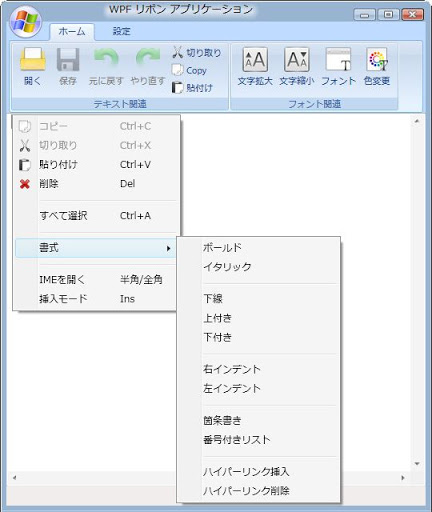
4.ContextMenu on RichTextBox


 * The header is shown correctly, which means "IMEを開く"/"IMEを閉じる"-menu
   ,unless directly switching IME-Mode out of this application.... so far.
   ( I mean, I didn't add the Eventhandler for it. )

5.Showing the Most Recent used files a.k.a. MRU

 After saving a text on a file, and restarting application again, then the most recent used file(s) appears like following.
 unless either deleting the data by clicking "情報削除"-Button in "最近使ったファイル"-Group on "設定"-Tab
 or deleting the registry-key directly.


 MRU data is stored in Registry, "HKEY_CURRENT_USER\Software\<applicationName>\"
... Well, I hope the next .net framework, .net framework 4, has RibbonControlsLibrary.

PS: プログラミング前の印象とはうらはらに、リボンの実装ってとても簡単だった。。。