ページ

Sunday, December 6, 2009

WPF Ribbon Application

As my next challenge, I tried creating a simple WPF Ribbon Application.
Using RibbonControlsLibrary, it's very easy to create Ribbon-designed application which looks like  Office 2007.
However, therefore the user would require high-level user experience, I think.

1. Starting the application.


2.Simple FontDialog & ColorDialog for WPF Application.


 *When a font is selected on the FontDialog, the font is supposed to be checked if it's available or not on WPF.
  That's because the incorrect-format-font causes the System.IO.FileFormatException.


3. Customizing the Skin on Application.


 *As the default skin, it seems there're 3 type ones: black, blue and silver.

4.ContextMenu on RichTextBox
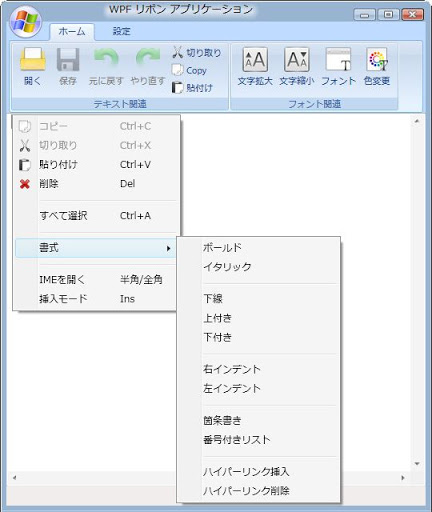


 * The header is shown correctly, which means "IMEを開く"/"IMEを閉じる"-menu
   ,unless directly switching IME-Mode out of this application.... so far.
   ( I mean, I didn't add the Eventhandler for it. )

5.Showing the Most Recent used files a.k.a. MRU

 After saving a text on a file, and restarting application again, then the most recent used file(s) appears like following.
 unless either deleting the data by clicking "情報削除"-Button in "最近使ったファイル"-Group on "設定"-Tab
 or deleting the registry-key directly.


 MRU data is stored in Registry, "HKEY_CURRENT_USER\Software\<applicationName>\"
... Well, I hope the next .net framework, .net framework 4, has RibbonControlsLibrary.

PS: プログラミング前の印象とはうらはらに、リボンの実装ってとても簡単だった。。。

Tuesday, November 24, 2009

WPF Application with Bing API

There's something annoys me on the Internet...When I see a blog written by another languages.
So I created a translator application by WPF(Windows Presentation Foundation) with Bing API.
(well, I think "Bing Translator" site is better/easier than the application to use usually. :p )

Bing Translator
http://www.microsofttranslator.com/

Bing Developer Center
http://www.bing.com/developers/default.aspx
* Gotta create AppID on Bing Developer Center.


1.Starting the application


2.translating the input texts


3.Copying the result to Clipboard


*Pasting the result on Notepad via Clipboard


4.Changing the source/target Language

  4-1.Opening Expander


  4-2.Selecting Another language and Translating the text


  4-3.Closing Expander


5.Clearing the Textbox (Reset)


But, where is the auto-detect by Bing API?
Well, I couldn't find it after all.
So, I tried directly using "Microsoft Translator".
(Another version application of the above one.)

* Auto-detect(自動抽出)


 1.Launching the application


 2.translating the input texts


 3.Translating an undetectable text


By the way, this kind of application requires Internet connection.
So, this application checks whether network is available on the computer by NetworkAvailabilityChangedEventHandler.


 *Network unavailable: Buttons and the others are set as "Disabled".
 *Network available: Buttons and the others are set as "Enabled".


Ah, I can guess "Out-of-Browser" on silverlight3 would be the same like that.
and I think the Out-of-Browser must be totally better, in order to shield the AppID.

Friday, November 20, 2009

家鯖増築 a.k.a. Windows Home Server Add-ins

I tried another thing.

I think it's very easy to program an Add-ins for Windows Home Server.
But, it's NOT easy as to what to create the Add-ins along with the service.

So now, I did a simple add-ins for "notepad" on windows home server console.
(instead of "notepad.exe" by Program Launcher or something like that.)
This provides any client machines under the Home Server to shared text files by use of this add-ins.
Because the files are supposed to be saved in "D:\" on Home Server as default.
If you have more than two machines in the local network, it must be helpful when the machine(s) have trouble.
When you fall into the trouble on more than one of the machines, you might check the one with opening Home Server Console.
Then, you can write down some informations and share them by a text file.

I know this add-ins would probably have some bugs because I really easily created it.
So, I think I will recheck the code in the future...maybe.

Windows Home Server SDK
http://msdn.microsoft.com/en-us/library/cc952481.aspx


Install(msi file created by Wix):


Add-ins:


Uninstall:


Monday, November 16, 2009

phpBB on Windows Azure feat. SQL Azure!

I tried creating another application on Windows Azure for the next test.
I used Visual Studio Web Developer 2008, but it seems we can even use eclipse for windows zure.
phpBB on Windows Azure Test site
http://goodnorning.cloudapp.net/
(* This site must be available until November 16, 2009) Until Dec 31, 2009
Eclipse for Windows Azure
http://www.windowsazure4e.org/


Saturday, October 3, 2009

Silverlight on Windows Azure!

I tried creating a simple silverlight page on Windows Azure for a test.
We will be able to provide high quality services by use of this kind of technology.
Well, this must be nicer than my current situation except for how much it’s going to cost for the cloud system.
Cuz I don’t have to pay attention to be monitoring any server machines, as for me, this is one of my big distresses in my life.

Silverlight on Windows Azure Test site
http://lol.cloudapp.net/
(* This site must be available until November 16, 2009)  Until Dec 31, 2009

1.Loading data from SQL Azure ( The pattern of Azure Storage Table is the same as SQL Azure )
Login:


Login as user (non-editable):


Login as Administrator (editable[insert,update,delete]):


* Windows Azure Storage Table is the same as SQL Azure

2.Loading from XML data in XAP file


*AutoCompleteBox

3. Virtual Earth Silverlight Map